


Design systems are extremely powerful when it comes to quickly creating prototypes. As a design systems professional, I've experienced this firsthand. In this article, I'd like to share my personal experience of using design systems to create prototypes and the real benefits.
As a Front-end Developer with design experience, my career is littered with moments when I was tasked with creating a proof of concept, a demo, an example, or a prototype piece of UI. Sometimes, it would be a direct request, such as, "We need a prototype of X for Y." In other cases, it wouldn't be directly asked for, but the best answer to their question would be some kind of example or prototype.
Here are three instances in my career where prototypes played a pivotal role and how design systems improved their creation and execution.
BaseKit UI Testing
A significant portion of my time at BaseKit was spent creating interactive prototypes to test out new UI concepts in focus groups. BaseKit is an online website builder, and as you can imagine, building a web tool that, in turn, builds for the web is rather complex.
Alongside the prototypes, I worked closely with the head of design to gather components, patterns, colors, and more into what we called a "UI Library". Little did we know that, unknowingly, we were 1. making a design system and 2. how important of an asset it would be to our work.
The Problem
We were briefed on the very large task of refreshing our online builder interface to make it more modern and appealing to customers. We were very much on board with this, as we wanted to improve the UI as well. However, we had a very tight turnaround, and ideally, we'd like to fit in rounds of design iterations, including user testing.
How could we, a small team with a narrow timeframe, create and refine iterations of a brand-new user interface?
Solving With Design Systems
Out of the gate, we knew it wouldn't be possible to design and build an entirely new interface from nothing; we needed to use existing assets. We also wanted to create something that felt as native as possible while being on the web. Material, Google's public-facing design system, was the ideal choice.
Now that we had our base, we could design and build components that catered to our needs. It didn't take us long before we had prototypes that we could test in focus groups and begin to iterate upon.
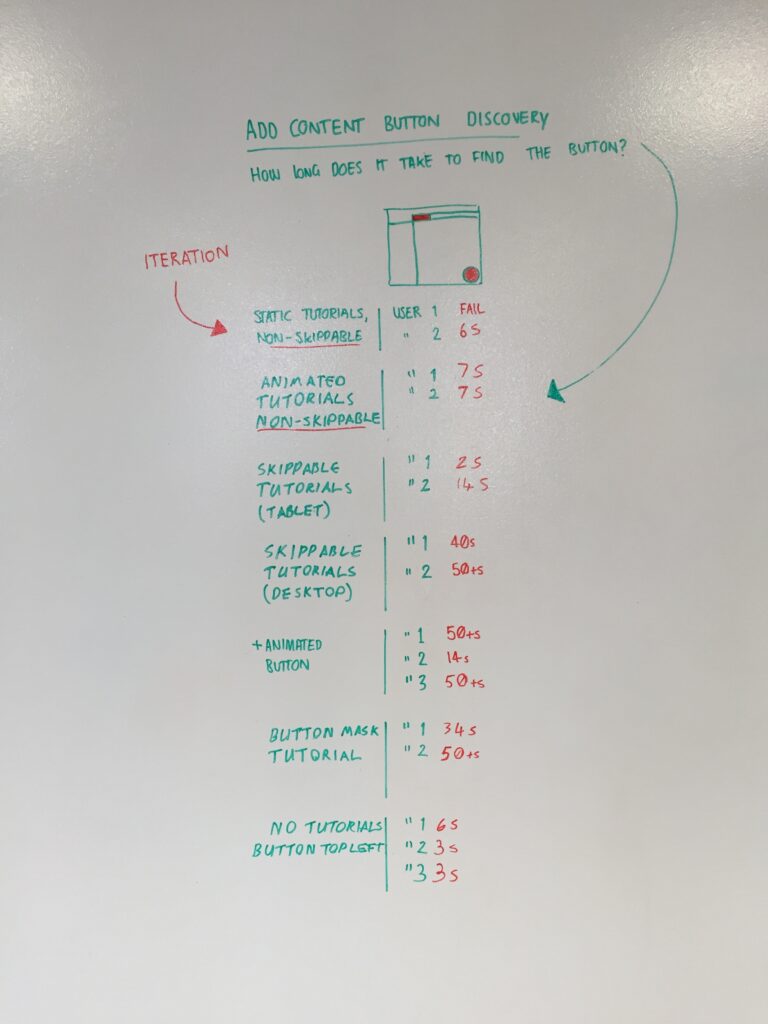
We compiled those customized components alongside our patterns and color choices into our aforementioned UI Library. Then, with the assistance of templating tools, I connected those components and assets together into presentable and usable prototypes. The templating tool, which in this case was Jekyll, allowed me to reuse components easily and create many iterations quickly. We were even able to organize our iterations to see how the UI evolved.
Once developers were given the go-ahead to begin work on the front end, they were also able to remove the components we had created and use them in the actual product.
Key Takeaways
- Reusable components and assets save time and reduce overhead
- Easy-to-use components can help with iterative development
- Design systems benefit design and development even outside of the product
- Even "off-the-shelf design systems" can provide immense value
Simpleweb X iOS App Development
Due to non-disclosure agreements, I'm not allowed to share the iOS app I developed at Simpleweb. Let's just call it a Project Management Tool for a large product company.
The company already had a web-based application. However, a large portion of the user base operated in remote or outdoor locations, which often resulted in patchy connections and poor signal. The client wanted a native iOS application that could provide as much value as possible while the user was offline and sync when they reconnected. If this went well, they could then pitch the respective Android application for other platforms as well.
The Problem
Once again, we were hit with a tight deadline to produce a functional prototype to show the client. However, we were even more limited in capacity, with only myself and another developer to call upon. We also discovered that while our client had collated together branding material, they didn't have a design system to speak of. Components, patterns, and colors were all trapped inside the product.
Solving Without Design Systems
To eliminate design overhead, we decided to mirror the web interface as much as possible. This resulted in decisions being answered with "What does the website do?" It's not ideal, but it's better than nothing. We used whiteboards to break down the user interface into what we reasonably could think were components. This was very much a collaborative task that helped us in the long run, meaning we had a common and agreed-upon component list to reference and use. We couldn't dwell on this for long, though, as we needed to move quickly.
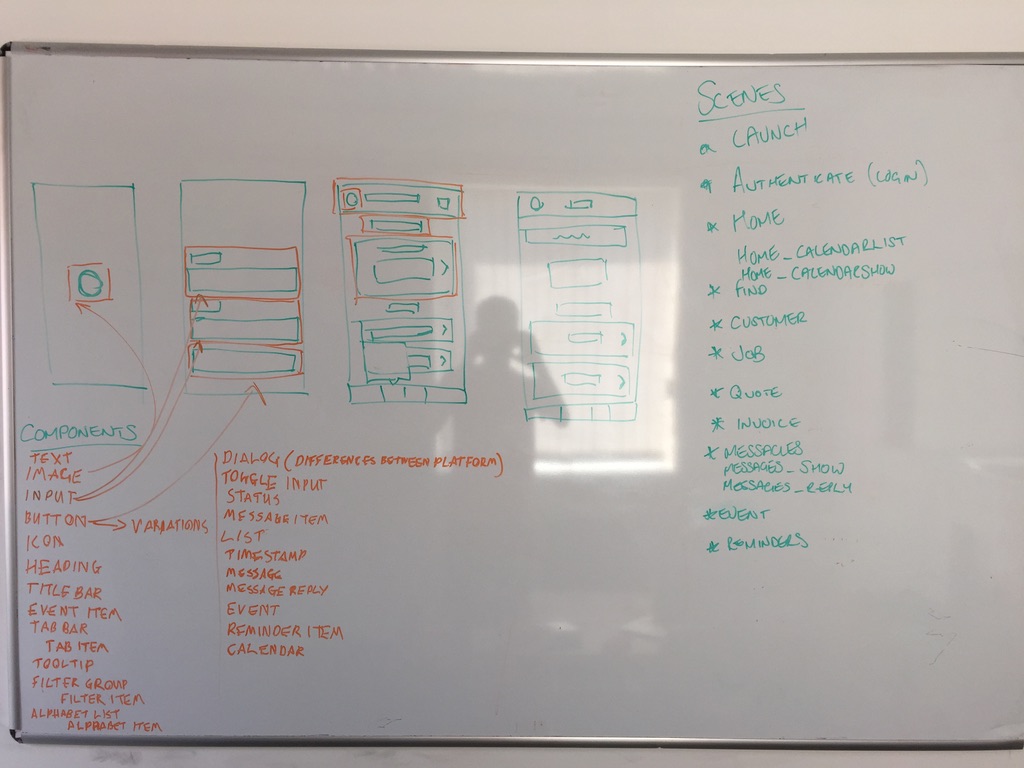
Throughout development, we drew upon the website itself, our limited assets, and the agreed-upon component list we'd deciphered from our wireframes. We met our deadline. However, I can't help but think of what we would've had if we had an existing design system to utilize. I don't think anyone is to blame for not providing us with a design system for this work, but it's interesting to speculate how different our experience would've been.
How Design Systems Might Have Helped
- Eliminate decision-making in the design and development process
- Reduced time taken to locate design tokens
- Reduced time taken to build out components
- UI could've been broken down based on existing components
- Faith in knowing the design would harmonize with existing products
- Far more knowns than unknowns
Nord Design System Demos
I've shared a couple of quite large-scale projects, either a whole UI overhaul or an entire built application. But here, I wanted to share an example of something much more nuanced and small-scale while still showing the benefits of design systems in prototyping.
For those who don't know, I worked on Nord Design System, which was designed and built to support Nordhealth's suite of healthcare applications. As part of the design system team, we were called upon to provide design and frontend solutions, either surfacing in new design system contributions or, more commonly, prototypes and examples of how to solve people's problems with existing design system components.
The Problem
It was extremely common in our open design system Slack channel that developers would ask how to build something using components and assets in Nord. Our components were primitives, but the UI frontend developers were building were complex. We needed a method of providing solutions fast, if there was one, without immediately jumping to creating new components.
Prototyping The Solution
Nord is full of component examples and prototypes. Because of our rigorous component testing process, we would end up creating all sorts of examples, and rather than throw them away, we would include them alongside the component itself in our documentation.
This wasn't enough, though; we would need to make more to better align with developers' requests. The process we naturally came to was to create examples in CodePen, a tool for online code demos, and copy those examples back into the design system. This created a constantly evolving repository of examples and prototypes for developers to draw upon.
This was supported in part thanks to the "Edit in CodePen" button we added to all component examples, which would copy that code into the CodePen editor so anyone could immediately start bashing together a new example. I believe this was a seriously underrated feature that helped us get Nord into the place it is today.
How Design Systems Helped
- Examples could be created with one click from a component doc
- Examples could be constantly updated and expanded upon
- Large repository of existing examples
- Aligned on answers to problems past and present
- Low overhead to close the loop between the design system team and developers
- Living documentation for developers
- Robustly tested examples
In Review
Now that I've shared in-depth 3 instances of where design systems did, or could have, helped, let's review the benefits of prototypes created in conjunction with design systems:
Time & Capacity
Many of us in the design systems space are aware that they save on time and capacity. But what has become clear from my experience is that even without a design system and striving to create one, we can still have returns on investment. Even having a design system as a goal means you'll be well on the upward incline of that hockey stick graph people talk about.
Decision Making
I've heard people describe a design system as simply a bunch of decisions, and I don't hate that definition. From what I shared above, you can see that time can be lost and saved when someone merely needs to make a decision. A color, a spacing value, a component usage, all could be decided ahead of time through careful design system choices and prototypes.
Consistency
Design systems that strive for constancy in their products can also strive for it in their prototypes. Ultimately, those prototypes are reference points, or artifacts, for designers and developers to use and draw from, just as a design system does.
Education
From what I see, we, as design system practitioners, can educate our wider teams not just through documentation but also through examples, demos, and prototypes. If we see ourselves as foundations of knowledge, we shouldn't turn the tap off. We should share and iterate through documented prototypes and examples.
I'd love to hear your thoughts on prototypes in design systems and whether you have any stories like the ones above. I would also like to hear from you on how your design system, or lack of one, changed how you were able to iterate in your development work.
